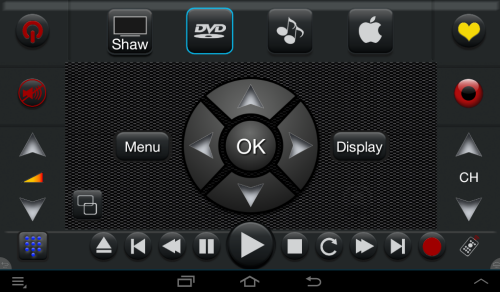
Media includes DVD, Blu-Ray, VCD and streaming media such as Apple TV.
In Watch Media mode you typically have the controls which are familiar to most DVD / Blu-ray users. Most important is the big blue Play Button in the middle. Before attempting to play, make sure that there is a disk loaded in the player. Different combinations of buttons will appear depending on the device.

Eject Chapter- Rewind Pause Play Stop Forward Chapter+
Touch to open or close the Disc Drawer.
Touch to jump back to the previous chapter of the movie.
Plays the video in reverse. Touching it again makes the speed faster on most units. Touch Play to resume normal playback.
Temporarily stops video playback.
Starts the Disk playing.
Stops playback, so you can load another disk or go to another mode. If you change modes without stopping the playback, the disk may continue playing.
Touch to increase playback speed and fast forward. Touch Play when you have gone far enough.
Jumps to the next chapter and resumes playback.
The effect will vary depending on your device. It will generally bring up a menu for setting language, subtitles, and special features. You can navigate with the central arrow keys and touch OK to make a selection.
Shows on screen info.
These days many media players have additional features such as 3D, Internet access and so on. You may have to add some custom buttons to make these features convenient to use.